개요
설명
1일차에 슬라임건의 움직임을 구현했는데 2일차에는 흡입시 나오는 회오리와 오브젝트 처리, UI업데이트를 구현하였음

기능 구현
슬라임건 흡입 회오리운동
> 회오리 코드
 [Header("총구")]
 [SerializeField] Transform muzzle; // 총구 위치 (흡입 방향)
 [Header("빨려들어가는 지점")]
 [SerializeField] Transform suctionPoint; // 빨려들어가는 지점 (흡입 방향)
 [Header("흡입가능한 레이어")]
 [SerializeField] LayerMask suctionLayer; // 흡입 가능한 레이어

  [Header("흡입 길이&각도")]
 [SerializeField] float range = 12f; // 흡입 최대 거리
 [SerializeField, Range(1f, 120f)] float coneAngle = 35f; // 흡입 각도 (원뿔 형태)

 [Header("흡입력")]
 [Tooltip("축 방향(앞쪽)으로 빨아들이는 힘")]
 [SerializeField] private float axisPullStrength = 25f;
 [Tooltip("원뿔 중심축으로 모으는 힘(이게 높을수록 '중심으로 말려 들어감'이 강해짐)")]
 [SerializeField] private float centerStrength = 55f;
 [Tooltip("흡입 시 회전력 세기")]
 [SerializeField] float swirlStrength = 18f; // 흡입 시 회전력 세기
 [Tooltip("흡입 시 속도 감쇠 세기")]
 [SerializeField] float damping = 6f; // 흡입 시 속도 감쇠 세기
 [Tooltip("흡입 시 최대 속도")]
 [SerializeField] float maxSpeed = 20f; // 흡입 시 최대 속도

 [Tooltip("중심파워")]
 [SerializeField] private float swirlNearCenterBoost = 1.5f; // 오브젝트가 빨려들어가는 지점에 가까울수록 회전력이 더 강해지는 효과 (1이면 변화 없음, 1보다 크면 가까울수록 회전력 증가)

 [SerializeField] float captureRadius = 0.5f; // 흡입 대상이 빨려들어가는 지점에 도달했을 때의 반경
 [SerializeField] bool enableCapture = false; // 흡입 대상이 빨려들어가는 지점에 도달했을 때 완전히 흡수되는 기능 활성화 여부

    private void FixedUpdate()
    {
        if (isLookOff) return;
        if (!isAttacking) return;
        Fire();
    }

    //============= 흡입 기능 ================

private void Fire()
{
    if (muzzle == null || suctionPoint == null) return;

    Vector3 origin = muzzle.position;
    Vector3 axis = muzzle.forward.normalized;  // 흡입 방향 (총구의 정면)

    float cosLimit = Mathf.Cos(coneAngle * Mathf.Deg2Rad); // 원뿔 체크를 위한 코사인 값

    int count = Physics.OverlapSphereNonAlloc(origin, range, overlapBuffer, suctionLayer, QueryTriggerInteraction.Ignore);
    int drawn = 0;

    // 범위 내의 콜라이더들을 감지하여 흡입 처리
    for (int i = 0; i < count; i++)
    {
        Collider col = overlapBuffer[i];
        if (!col) continue;

        Rigidbody rb = col.attachedRigidbody; // Rigidbody가 없는 오브젝트는 흡입하지 않음
        if (!rb || rb.isKinematic) continue;

        //  최대 선속도 제한(폭주 방지)
        if (rb.maxLinearVelocity < maxSpeed)
            rb.maxLinearVelocity = maxSpeed;

        Vector3 objPos = rb.worldCenterOfMass;

        // 원뿔(콘) 체크
        Vector3 toObj = objPos - origin;// 총구에서 오브젝트까지의 벡터
        float dist = toObj.magnitude; // 총구에서 오브젝트까지의 거리
        if (dist < 0.0001f) continue;

        Vector3 dir = toObj / dist;// 총구에서 오브젝트까지의 방향(단위 벡터)
        float align = Vector3.Dot(axis, dir); // 흡입 방향과 오브젝트 방향의 정렬 정도 (1에 가까울수록 정렬)
        if (align < cosLimit) continue;

        // 흡입 방향(목표점)
        Vector3 toSuck = (suctionPoint.position - objPos); // 오브젝트에서 빨려들어가는 지점까지의 벡터
        float d = toSuck.magnitude + 0.001f;

        // 거리/각도 기반 가중치
        float falloff = Mathf.Clamp01(1f - (d / range)); // 거리가 멀어질수록, 각도가 벌어질수록 힘이 약해짐
        float angleWeight = Mathf.InverseLerp(cosLimit, 1f, align); // 원뿔의 가장자리에서는 힘이 약해지고, 중앙에서는 최대가 됨

        float w = falloff * angleWeight;
        if (w <= 0f) continue;
        // --- 토네이도 핵심: "축 중심으로 말려 들어오기 + CCW 회전" ---
        // 1) 축 위의 최근접 점(원뿔 중심선의 단면 중심)
        float axial = Vector3.Dot(objPos - origin, axis);  // 축 방향 거리
        axial = Mathf.Clamp(axial, 0f, range);
        Vector3 axisPoint = origin + axis * axial;

        // 2) 축으로 모으는 힘(센터링)
        Vector3 radialFromAxis = objPos - axisPoint;       // 축 -> 오브젝트
        float radialDist = radialFromAxis.magnitude;

        Vector3 toAxisDir = (radialDist < 0.0001f) ? Vector3.zero : (-radialFromAxis / radialDist);

        // 원뿔 반경(해당 axial 위치에서)
        float coneRadiusAtAxial = Mathf.Tan(coneAngle * Mathf.Deg2Rad) * (axial + 0.001f);
        float centerW = (coneRadiusAtAxial <= 0.0001f) ? 1f : Mathf.Clamp01(1f - (radialDist / coneRadiusAtAxial));

        Vector3 centerForce = toAxisDir * (centerStrength * w);

        // 3) 축 방향으로 빨아들이기(앞쪽 진행감)
        Vector3 toSuction = suctionPoint.position - objPos;
        float f = toSuction.magnitude + 0.001f;
        Vector3 pullDir = toSuction / f;

        Vector3 axisPullForce = pullDir * (axisPullStrength * w);

        // 4) 반시계(CCW) 스월: tangent = Cross(axis, radialFromAxis)
        // (만약 현장에서 방향이 반대로 느껴지면 Cross 순서를 반대로 바꾸면 됨)
        Vector3 tangent = (radialDist < 0.0001f) ? Vector3.zero : Vector3.Cross(axis, radialFromAxis).normalized;

        float swirlBoost = Mathf.Lerp(1f, swirlNearCenterBoost, centerW);
        Vector3 swirlForce = tangent * (swirlStrength * w * swirlBoost);

        // 5) 안정화(댐핑)
        Vector3 dampForce = -rb.linearVelocity * damping;

        rb.AddForce(centerForce + axisPullForce + swirlForce + dampForce, ForceMode.Acceleration);


        // 힘 시각화(플레이 중 Scene 뷰)
        if (drawForceRays && drawn < maxForceRaysPerFrame)
        {
            DrawForceRays(objPos, centerForce, axisPullForce, swirlForce, dampForce);
            drawn++;
        }
    }
}| ● 회오리 코드 설명 |
| Fire()는 총구 전방 원뿔 범위 내에서 물리 오브젝트를 탐색(NonAlloc)하고, 대상이 Rigidbody를 가진 경우만 흡입 대상으로 처리한다. 대상이 원뿔 각도/거리 조건을 만족하면 거리·각도 가중치(w)를 계산해 흡입 강도를 결정한다. 흡입 힘은 ①축 중심으로 모으는 센터링 + ②suctionPoint로 당기는 힘 + ③반시계 나선 회전력(접선 힘)을 합성해 토네이도 흡입을 만든다. 속도 폭주를 막기 위해 maxLinearVelocity 상한과 감쇠(damping)를 적용해 안정적인 끌림을 유지한다. 디버그 옵션이 켜지면 각 힘 벡터를 Ray로 시각화해 튜닝/검증이 가능하다. |
*draw 기능도 있지만 이건 gpt선생한테 다 맞긴거라 본인도 이해못함ㅎ
인벤토리와 UI
> Inventory 코드
    [Header("데이터")]
    private ItemDef itemDatabase;

    [Header("Slots")]
    [SerializeField] private int slotCount = 4;
    [SerializeField] private int maxPerSlot = 50;

    private Slots[] slots;
    public Slots[] _Slots => slots;

    public event Action<int, Slots, ItemDefSO> OnSlotChanged;
    // 빠른 조회
    private readonly Dictionary<int, ItemDefSO> defById = new();

    public int SlotCount => slots?.Length ?? 0;

    private void Awake()
    {
        itemDatabase = GameManager.Resource.Load<ItemDef>("Game1/Data/ItemDef");
        EnsureSlotsArray();
        RebuildCache();
        SyncAll();
    }

    public bool TryAdd(int id, int amount = 1)
    {
        if (id <= 0 || amount <= 0) return false;
        if (!defById.ContainsKey(id)) return false;

        // 1) 같은 id 스택 채우기
        for (int i = 0; i < slots.Length && amount > 0; i++)
        {
            if (slots[i].IsEmpty) continue;
            if (slots[i].id != id) continue;
            if (slots[i].count >= maxPerSlot) continue;

            int add = Mathf.Min(amount, maxPerSlot - slots[i].count);
            slots[i].count += add;
            amount -= add;
            RaiseChanged(i);
        }

        // 2) 빈 슬롯에 배치
        for (int i = 0; i < slots.Length && amount > 0; i++)
        {
            if (!slots[i].IsEmpty) continue;

            int add = Mathf.Min(amount, maxPerSlot);
            slots[i].id = id;
            slots[i].count = add;
            amount -= add;
            RaiseChanged(i);
        }

        return amount <= 0;
    }

    public bool TryEject(int slotIndex, Vector3 spawnPos, Vector3 dir, float impulse = 8f)
    {
        if ((uint)slotIndex >= (uint)slots.Length) return false;
        if (slots[slotIndex].IsEmpty) return false;

        int id = slots[slotIndex].id;
        if (!defById.TryGetValue(id, out var def) || def == null) return false;
        if (string.IsNullOrEmpty(def.prefabPath)) return false;

        Vector3 fwd = dir.sqrMagnitude < 1e-6f ? Vector3.forward : dir.normalized;
        Quaternion rot = Quaternion.LookRotation(fwd);

        GameObject go = GameManager.Resource.Instantiate<GameObject>(def.prefabPath, spawnPos, rot);
        if (go == null) return false;

        if (go.TryGetComponent<Rigidbody>(out var rb))
        {
#if UNITY_6000_0_OR_NEWER
            rb.maxLinearVelocity = Mathf.Max(rb.maxLinearVelocity, impulse);
            rb.linearVelocity = fwd * impulse;
#else
            rb.velocity = fwd * impulse;
#endif
        }

        slots[slotIndex].count--;
        if (slots[slotIndex].count <= 0) slots[slotIndex].Clear();

        RaiseChanged(slotIndex);
        return true;
    }

    public ItemDefSO GetDefById(int id)
    {
        defById.TryGetValue(id, out var def);
        return def;
    }

    private void EnsureSlotsArray()
    {
        if (slotCount < 1) slotCount = 1;
        if (slots == null || slots.Length != slotCount)
            slots = new Slots[slotCount];
    }

    public void RebuildCache()
    {
        defById.Clear();
        if (itemDatabase == null) return;

        var list = itemDatabase.itemDefInfo;
        for (int i = 0; i < list.Count; i++)
        {
            var def = list[i];
            if (def == null || def.id <= 0) continue;
            if (defById.ContainsKey(def.id)) continue;
            defById.Add(def.id, def);
        }
    }

    private void RaiseChanged(int i)
    {
        defById.TryGetValue(slots[i].id, out var def);
        OnSlotChanged?.Invoke(i, slots[i], def);
    }

    private void SyncAll()
    {
        for (int i = 0; i < slots.Length; i++)
            RaiseChanged(i);
    }
> Slots 코드
[Serializable]
public struct Slots
{
    public int id;
    public int count;

    public bool IsEmpty => id == 0 || count <= 0;

    public void Clear()
    {
        id = 0;
        count = 0;
    }
}
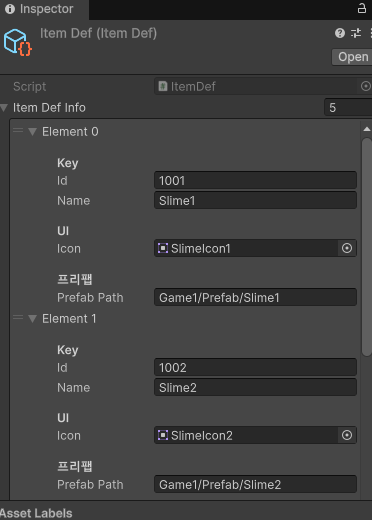
> Scriptable 코드
[CreateAssetMenu(fileName = "ItemDef", menuName = "Scriptable Objects/ItemDef")]
public class ItemDef : ScriptableObject
{
    public List<ItemDefSO> itemDefInfo = new List<ItemDefSO>();
}

[System.Serializable]
public class ItemDefSO
{
    [Header("Key")]
    public int id;    // 고유 아이디값
    public string name;
    [Header("UI")]
    public Sprite icon;
    [Header("프리팹")]
    public string prefabPath;
}
> 총구에서 처리하는 기능 코드
public class EnterMuzzle : MonoBehaviour
{
    private void OnTriggerEnter(Collider other)
    {
        if (other.gameObject.layer != LayerMask.NameToLayer("Slime"))
            return;
        if (!other.TryGetComponent<Slime>(out var item))
            return;
        var inv = GameManager.Unit.game1Player.inventory;
        if (inv.TryAdd(item.id, item.amount))
        {
            Destroy(other.gameObject);
        }
        else
        {
            // 인벤에 못 넣는 경우(가득참/해당 아이템 공간 없음)
            // 여기서 효과음/문구/튕겨내기 처리 추천
            // 예: other.attachedRigidbody?.AddForce(-transform.forward * 5f, ForceMode.VelocityChange);
        }
    }
}
| ● Inventory 설명 |
| 정해진 슬롯갯수에 맞춰 스택을 생성하고 같은 id를 가진 오브젝트일 경우 amount의 갯수를 상승 시켜 갯수로 등록한다 정해진 슬롯에 오브젝트들이 전부 들어가게 되면 최대슬롯중 하나가 배출되지 않는 이상 더이상 수집을 하지않고 오브젝트 또한 사라지지 않음 |
> 인벤토리 UI관련 코드
    [SerializeField] private GameObject slot1;
    [SerializeField] private GameObject slot2;
    [SerializeField] private GameObject slot3;
    [SerializeField] private GameObject slot4;
    [SerializeField] private TMP_Text slot1Text;
    [SerializeField] private TMP_Text slot2Text;
    [SerializeField] private TMP_Text slot3Text;
    [SerializeField] private TMP_Text slot4Text;


   [Header("Icon Padding")]
    [SerializeField] private Vector2 iconPadding = new Vector2(10f, 10f);

    private const string ICON_NAME = "__ItemIcon";

    private GameObject[] slotRoots;
    private TMP_Text[] countTexts;
    private Image[] iconImages;              // 슬롯별 아이콘 캐시
    private Game1Inventory inventory;

    protected override void Awake()
    {
        base.Awake();
        inventory = GameManager.Unit.Game1Player.inventory;
        slotRoots = new[] { slot1, slot2, slot3, slot4 };
        countTexts = new[] { slot1Text, slot2Text, slot3Text, slot4Text };
        iconImages = new Image[4];

        // 초기 표기
        for (int i = 0; i < 4; i++)
            SetSlotView(i, default, null);
    }

    private void OnEnable()
    {
        if (inventory == null)
            inventory = FindFirstObjectByType<Game1Inventory>();

        if (inventory != null)
        {
            inventory.OnSlotChanged += OnSlotChanged;
            RefreshAll();
        }
    }

    private void OnDisable()
    {
        if (inventory != null)
            inventory.OnSlotChanged -= OnSlotChanged;
    }

    private void RefreshAll()
    {
        if (inventory == null) return;

        int n = Mathf.Min(4, inventory.SlotCount);
        for (int i = 0; i < n; i++)
        {
            var slot = inventory._Slots[i];
            var def = inventory.GetDefById(slot.id);
            SetSlotView(i, slot, def);
        }
    }

    private void OnSlotChanged(int index, Slots slot, ItemDefSO def)
    {
        if ((uint)index >= 4u) return;
        SetSlotView(index, slot, def);
    }

    private void SetSlotView(int index, Slots slot, ItemDefSO def)
    {
        // count text
        var text = countTexts[index];
        if (text != null)
            text.text = slot.IsEmpty ? "x" : $"x{slot.count}";

        // icon
        if (slot.IsEmpty || def == null || def.icon == null)
        {
            SetIcon(index, null);
            return;
        }

        SetIcon(index, def.icon);

        // 아이콘이 텍스트를 가리면 텍스트를 위로
        if (text != null)
            text.transform.SetAsLastSibling();
    }

    private void SetIcon(int index, Sprite sprite)
    {
        var root = slotRoots[index];
        if (root == null) return;

        // 없으면 생성(1회), 있으면 재사용
        var img = GetOrCreateIcon(index, root.transform);

        if (sprite == null)
        {
            // “없애기”를 성능 좋게: 비활성화 처리
            img.sprite = null;
            img.gameObject.SetActive(false);
            return;
        }

        img.sprite = sprite;
        img.gameObject.SetActive(true);
    }

    private Image GetOrCreateIcon(int index, Transform parent)
    {
        if (iconImages[index] != null)
            return iconImages[index];

        // 혹시 이미 존재하면 재사용
        var exist = parent.Find(ICON_NAME);
        if (exist != null && exist.TryGetComponent<Image>(out var existImg))
        {
            iconImages[index] = existImg;
            existImg.raycastTarget = false;
            existImg.preserveAspect = true;
            return existImg;
        }

        // 새로 생성
        var go = new GameObject(ICON_NAME, typeof(RectTransform), typeof(Image));
        go.transform.SetParent(parent, false);

        var rt = (RectTransform)go.transform;
        rt.anchorMin = Vector2.zero;
        rt.anchorMax = Vector2.one;
        rt.offsetMin = iconPadding;
        rt.offsetMax = -iconPadding;

        var img = go.GetComponent<Image>();
        img.raycastTarget = false;
        img.preserveAspect = true;

        // 기본은 뒤에 깔고(배경 위), 텍스트는 SetAsLastSibling로 위로 올림
        go.transform.SetAsFirstSibling();

        iconImages[index] = img;
        return img;
}| ● 설명 |
| 총 4개의 SlotUI에 Scriptable에 저장된 icon을 자식오브젝트로 넣고 배출시에는 없애는 형태임 또한 흡수한 갯수에 따라 text도 반영됨 |
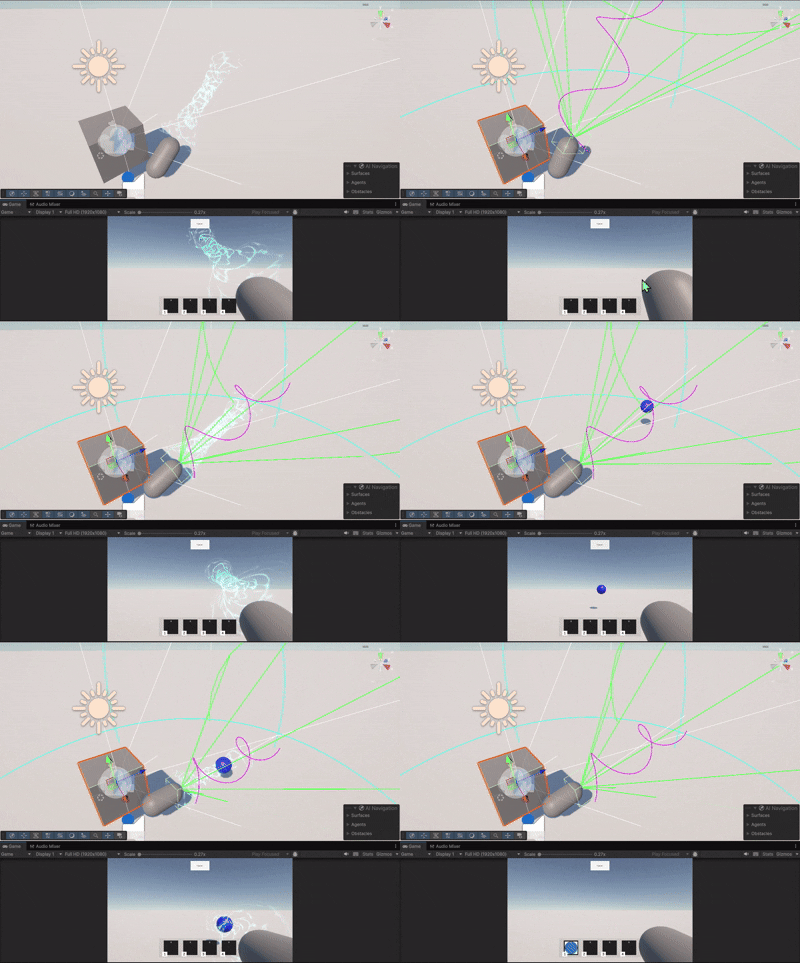
버그수정
| 발생 | 본래 기획된 반시계반향으로 빨려들어오지 않고 시계반향으로 중심이 아닌 외곽으로 돌음 |
| 문제 | 반시계 방향에 대한 처리가 없고 회오리 처음부터 끝점까지 같은 회전력을 갖고 있어서 불안정함 |
| 해결 | 축 방향을 재처리하고 회오리 시작점과 끝점의 빨아댕기는 힘을 별도로 두어 시작점에서 끝점까지 점점 세기가 쎄지게 만듬 |
마치며.
2일차에 슬라임건에 핵심인 흡입기능을 완료하였고 다음시간엔 배출과 사운드 디자인모델을 적용하도록 하겠음
'연구노트' 카테고리의 다른 글
| [슬라임랜처] 슬라임건 기능구현-3(완) (0) | 2026.02.20 |
|---|---|
| [슬라임랜처] 슬라임건 기능구현-1 (1) | 2026.02.18 |
| 연구노트_기존 사운드 매니저 방식 수정 (0) | 2026.02.13 |